Elevating Your Brand Identity: The Ultimate Guide to Stationery Branding Kit Mockups
In the competitive landscape of modern business, first impressions are not just important; they are everything. Before a client signs a contract or a customer makes a purchase, they often judge a company by its visual presentation. This is where the concept of a Stationery Branding Kit Mockup becomes an indispensable tool for designers, entrepreneurs, and marketing professionals alike. But what exactly is it, and why has it become a cornerstone of professional brand identity systems?
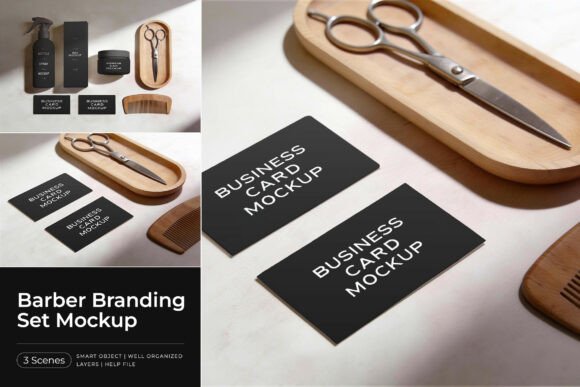
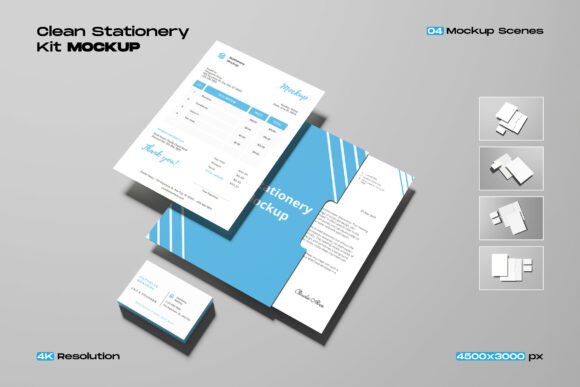
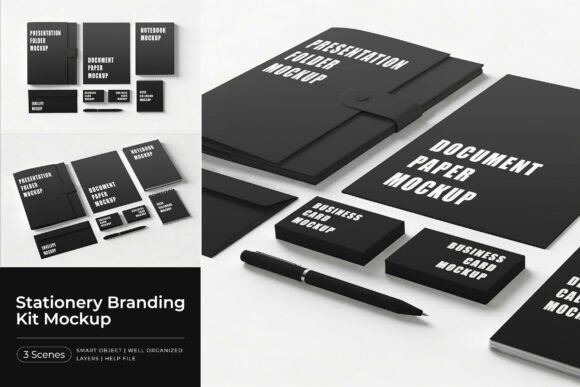
At its core, a stationery branding kit mockup is a digital template designed to showcase a complete corporate identity in a realistic, high-quality setting. Unlike a flat digital file that shows a logo on a white background, a mockup places your design onto real-world objects like presentation folders, document papers, notebooks, business cards, envelopes, calendars, and pens. These items are arranged in clean, well-balanced scenes that mimic professional photography, allowing stakeholders to visualize how the brand will look in physical form.
The Strategic Value of Visualizing Brand Identity
You might wonder why one cannot simply present a logo file and a color palette to a client. The answer lies in human psychology and perception. A logo on a screen feels abstract. However, seeing that same logo embossed on a textured business card or printed on a crisp letterhead makes the brand feel tangible, established, and trustworthy.
A Stationery Branding Kit Mockup bridges the gap between digital design and physical reality. It serves as a powerful communication tool that helps clients understand the scope and consistency of their new brand. When a potential investor sees a cohesive set of materials—from the pen they sign with to the folder holding their proposal—they perceive a higher level of professionalism. This psychological impact is crucial for startups seeking funding or established companies undergoing a rebrand.
Furthermore, these mockups are essential for portfolio building. For graphic designers, presenting work in a vacuum can diminish its perceived value. By utilizing a high-resolution mockup set, designers can demonstrate their ability to create comprehensive systems rather than isolated graphics. This context elevates the quality of the portfolio and often leads to better client acquisition.
What Makes a High-Quality Mockup Set?
Not all mockups are created equal. To truly serve its purpose, a branding kit must meet specific technical and aesthetic standards. A professional set, such as the modern collection described in industry standards, typically includes a variety of essential stationery items. These usually encompass:
- Presentation Folders: Essential for meetings and pitches, showcasing the brand's organizational style.
- Document Papers and Letterheads: The backbone of formal correspondence.
- Notebooks and Notepads: Items that stay on a client's desk, providing constant brand exposure.
- Business Cards: The most traditional yet vital networking tool.
- Envelopes: Demonstrating attention to detail in mailings.
- Calendars: Offering long-term visibility throughout the year.
- Pens and Writing Instruments: Functional items that reinforce brand utility.
The arrangement of these items is equally critical. They must be staged in clean and well-balanced scenes that do not distract from the design itself. Lighting should be natural, shadows soft, and textures realistic. A resolution of 4500x3000 pixels at 300 DPI is the gold standard, ensuring that the images remain sharp whether viewed on a high-definition monitor or printed in a large-format portfolio book.
Demystifying the Technology: Smart Objects and Ease of Use
One common misunderstanding among beginners is that creating these realistic visuals requires advanced 3D modeling skills or expensive photography equipment. In reality, modern mockups rely on the power of Adobe Photoshop and a feature known as "Smart Objects." This technology simplifies the workflow dramatically, making it accessible to users of all skill levels.
The process is remarkably straightforward. A typical professional package includes multiple Adobe Photoshop PSD files. Each file contains pre-set layers where the user's artwork can be inserted. The magic happens through Smart Object layers, which act as windows into the design. When you update the content within this specific layer, the software automatically warps, lights, and textures the image to fit the object perfectly.
Here is a step-by-step breakdown of how to utilize these tools effectively:
- Open the PSD File: Launch Adobe Photoshop and open the specific mockup file you wish to use from the set.
- Locate the Smart Object: Navigate the layers panel to find the layer marked as a Smart Object (often indicated by a small icon on the layer thumbnail).
- Insert Your Design: Double-click the Smart Object layer. This opens a separate document window. Paste or place your logo and branding elements here, then save the file.
- Watch the Magic Happen: Return to the main mockup file. Your artwork will have automatically updated, conforming to the perspective, lighting, and texture of the stationery item.
This non-destructive editing workflow allows designers to experiment rapidly. You can test different color variations, logo placements, or paper textures in seconds without starting from scratch. It encourages creativity and iteration, enabling the designer to find the perfect presentation angle for the brand.
The Role of Mockups in Modern Business and Education
Beyond the immediate task of designing a logo, stationery mockups play a broader role in education and business strategy. In academic settings, design students use these kits to learn about brand consistency. They teach the lesson that a brand is not a single image but a system of touchpoints. By manipulating a full kit, students learn how a color looks different on matte paper versus glossy plastic, fostering a deeper understanding of materiality.
In the business world, these tools facilitate remote collaboration. In an era where many teams work digitally, sending a physical prototype of a business card is slow and costly. A high-fidelity mockup provides a near-identical representation instantly. This accelerates decision-making processes and ensures that all stakeholders, regardless of location, are aligned on the visual direction.
Moreover, the rise of e-commerce and digital marketing has increased the demand for high-quality visual assets. Social media posts featuring realistic product mockups tend to generate higher engagement than flat graphics. A well-composed image of a branded notebook on a wooden desk tells a story of lifestyle and aspiration, connecting emotionally with the audience in a way that a simple JPEG cannot.
Common Pitfalls and How to Avoid Them
While mockups are powerful, they can be misused. A frequent error is choosing a scene that clashes with the brand's personality. For instance, placing a luxury law firm's branding on a colorful, playful notebook setup sends mixed messages. It is vital to select a mockup environment that aligns with the brand's tone—whether that is minimalist and corporate, or vibrant and creative.
Another mistake is ignoring the resolution. Using low-resolution images for print presentations can result in pixelation, undermining the professional image the brand tries to project. Always ensure your source files and the mockup templates themselves are at least 300 DPI if there is any intention of printing the final presentation.
Additionally, designers should avoid over-relying on the mockup to fix poor design choices. A mockup can make a good design look great, but it cannot save a bad logo. The focus should always remain on the quality of the underlying branding work, with the mockup serving as the vessel to display it.
Conclusion: Empowering Your Creative Vision
The Stationery Branding Kit Mockup is more than just a digital file; it is a catalyst for professional growth and effective communication. By transforming abstract designs into tangible realities, these tools empower designers to tell compelling stories and help businesses establish a strong, credible presence in the market.
Whether you are a seasoned art director pitching to a Fortune 500 company or a student assembling your first portfolio, mastering the use of these mockups is essential. With features like easy-to-edit Smart Objects, high-resolution outputs, and comprehensive item lists including folders, pens, and calendars, the possibilities for creation are endless.
As you move forward, remember that the goal is not just to show what a brand looks like, but to show what it feels like to interact with it. So, open those PSD files, insert your unique creations, and have fun with your creation. The right presentation can turn a good idea into an unforgettable brand identity.